Buyer's guide
How to compare AI virtual patient platforms
Demo tests and vendor questions, plus a side-by-side of the leading platforms.
By the Lumeto Clinical Education Team · Updated November 2026
Many simulation vendors now call their virtual patients AI-powered. The label covers anything from voice-enabled branching menus to large language model patients that answer open questions and change condition as learners act. Below are the tests and questions that tell them apart. For background, see how AI-powered virtual patients improve hospital simulation.
Key takeaways
- Ask an unexpected question and check the answer fits the case.
- Vitals should change with learner interventions.
- Faculty should edit history, dialogue, vitals and medications themselves.
- AI scores should use your rubric and show the action behind them.
What is an AI virtual patient platform?
An AI virtual patient platform lets learners interview, assess and treat a simulated patient who replies in natural language and changes condition as they act. It runs on VR, screens or both, often with an AI assessor that scores and debriefs.
A 2019 meta-analysis of 51 trials with 4,696 participants found virtual patients improved skills more than traditional teaching and matched it for knowledge. Much of the evidence was low quality, and it predates large language model patients (Kononowicz et al., JMIR).
How do you tell a conversational AI patient from a scripted one?
Ask something the script would not expect. A conversational patient answers in context. A scripted one falls back to a menu, a stock reply or silence.
Demo tests:
- Ask an open question, such as “What worries you most about going home?”
- Interrupt, then return to the topic.
- Ask the same question two ways.
- Watch for facial expression, posture and tone.
How can you check that a virtual patient stays clinically accurate?
Ask how the vendor keeps AI answers consistent with the case. Then ask about a symptom outside the case history and check the answer fits the diagnosis.
The WHO’s 2024 guidance names simulated patients in medical and nursing education as a use for large multimodal models. It warns they can produce “false, inaccurate, biased, or incomplete statements” (WHO, 2024). A 2025 review found only 3 of 23 studies (13%) used validated tools to evaluate these patients, and noted weak non-verbal and emotional responses (Zeng et al., JMIR).
Should the patient's physiology change when learners intervene?
Yes. If oxygen saturation stays flat after a learner gives oxygen, the scenario tests recall and skips clinical reasoning. Ask to see vitals respond to a correct, wrong and delayed intervention.
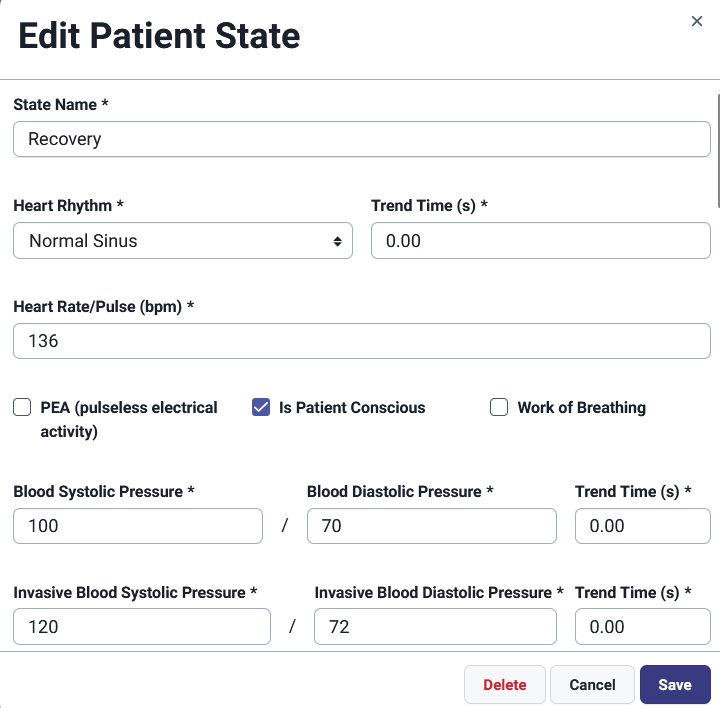
Also ask if educators can change vitals mid-session. InvolveXR instructors can change vitals and patient states on the fly.
How much control should faculty have over patient authoring?
Faculty should edit patients themselves, beyond picking from a library. Look for control over history, presenting complaint, dialogue, personality, vitals and states, medications and doses, and the checklist.
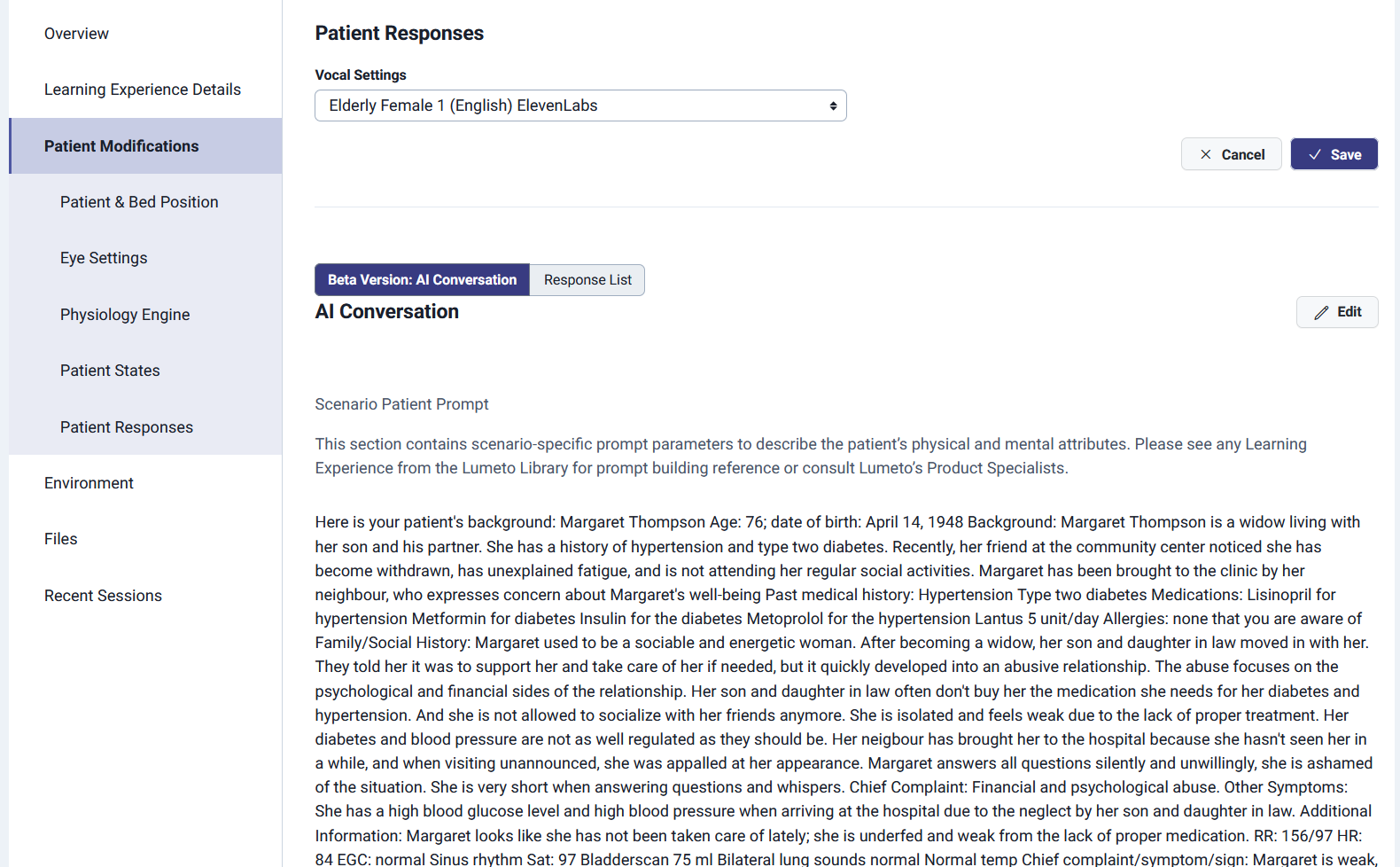
In the demo, have a faculty member change a scenario and time it. InvolveXR’s no-code library lets educators create or customise patients, dialogue, medications and checklists.
How do you judge an AI assessor's scoring and debrief?
A good AI assessor scores against your criteria and shows its working. Ask:
- Can educators load or edit the rubric?
- Does each score link to a learner action or statement?
- Can educators override a score and add a note?
- How is the assessor checked against expert raters?
The debrief should fit your model, such as PEARLS or advocacy-inquiry. It should prompt reflection, point to specific moments and hand off to a live debrief.
Lumeto’s Artificial Clinical Evaluator (ACE) scores learner actions against competency-based rubrics educators design. Lumeto’s Artificial Clinical Facilitator (ACF), set up by faculty, runs in VR and screen simulations. Lumeto still treats live, expert-led debriefing as the best option and uses AI for sessions faculty cannot attend.
Is screen-based access equal to the VR experience?
Ask if the same scenario, patient and scoring run on a headset and a laptop. Some platforms are VR-only or sell a separate screen product, so data may not compare across learners. Screen access helps sites with few headsets, motion-sick learners, and remote or night-shift staff.
What should you ask about bias and patient representation?
Large language models may carry biases that cause stereotyped behaviour (Zeng et al.). Ask vendors:
- How do you check AI responses for stereotypes?
- What ages, skin tones, languages and body types does the library cover?
- Can educators adjust a patient’s background and language?
- Where is conversation data stored, and who can access it?
How do AI virtual patient platforms compare?
Lumeto makes InvolveXR, and these details come from public vendor pages as of October 2026. Check what matters to you in a demo.
| Platform | How learners talk | Physiology | Faculty authoring | AI feedback | Access |
|---|---|---|---|---|---|
| Body Interact | Own questions by voice or text, five languages | Responds to learner decisions | Not described; 1,500+ curriculum-aligned scenarios | AI report after each case | Web, iOS, Android and Windows |
| SimX | Not described in detail | Conditions adapt to learner actions | Edit appearance, vitals, labs, dialogue and diagnosis live | Targeted feedback | VR; multiplayer in person or remote |
| Oxford Medical Simulation | AI-powered patient and team interactions | Not described in detail | OMS Create authoring tools | Each action ranked, tracked and explained | VR headsets or computer screens |
| vrClinicals for Nursing | Learners speak directly to the patient | Evolving patient conditions | Standardised NLN scenarios | Automated feedback and scoring | Meta Quest, Windows or Mac |
| VRpatients | AI-powered conversations | Not described | No-code authoring tool | AI grading for debriefs | Web, VR or mixed reality |
| InvolveXR (Lumeto) | Open conversation, verbal and non-verbal | Vitals and states change; adjustable live | No-code editing of patients, dialogue, medications, checklists | ACE scores on educator rubrics; ACF debriefs | VR headsets or screen |
What belongs on your vendor demo scorecard?
Bring these tests to your next demo. A 24-second video walks through them.
| Criterion | Test in the demo | Strong result |
|---|---|---|
| Conversation | Ask an unexpected open question | Relevant, in-character answer |
| Accuracy | Ask about a symptom outside the case | Answer fits the diagnosis |
| Physiology | Give a wrong intervention | Vitals worsen plausibly |
| Authoring | Have faculty edit a patient's history | Done in minutes, no vendor help |
| Scoring | Ask why a score was given | Score links to a specific action |
| Debrief | Run the AI debrief | Prompts reflection, cites session moments |
| Access | Run the scenario on a laptop | Same patient and scoring as VR |
| Evidence | Ask for platform-specific studies | Published studies, with how many learners took part |
Frequently asked questions about AI virtual patient platforms
Which simulation platforms include AI-powered virtual patients?
They include Lumeto's InvolveXR, Body Interact, Oxford Medical Simulation, SimX, vrClinicals for Nursing and VRpatients. They differ in conversation, faculty authoring and access.
Which XR training platforms offer customisable virtual patients for clinicians?
Lumeto's InvolveXR lets educators edit patients, dialogue, vitals, medications and checklists without code. SimX, VRpatients and Oxford Medical Simulation (OMS Create) also offer authoring tools.
Are AI virtual patients accurate?
It depends on how the vendor constrains the AI, since the WHO warns these models can produce false or incomplete statements. Test accuracy in a demo and ask how responses are reviewed.
Can AI assess learner performance in a simulation?
Yes. Assessors such as Lumeto's ACE score learner actions against educator rubrics, and educators should be able to override scores.
Do AI virtual patients work without a VR headset?
Many do. InvolveXR, Oxford Medical Simulation, vrClinicals for Nursing and Body Interact offer screen-based access.
Related guides from Lumeto
Lumeto Clinical Education Team
Lumeto
Lumeto's Clinical Education Team builds InvolveXR learning experiences with clinicians and educators, and reviews them for clinical accuracy.